Oracle Fusion Procurement
Mapping Sets in Purchasing Approvals
A Two-Mapping-Set Pattern
We all know and love the complex BPM system that drives approval routings in Oracle Fusion. While very flexible, it has limitations, and the design is beginning to show it’s age. In the last few years, Oracle stealthily added a new mapping set feature which makes it incredibly easy to write complex logical statements and derive the approver. Once you have done it, you’ll see how easy and fun it is, but it does have a steep learning curve. The Oracle documentation is good, but still confusing, so I’ve put together this guide that simplifies the process and helps you understand the why behind the what.
When using mapping sets to drive requisition and purchase order approval routing in Oracle Fusion, it’s important to understand that this design relies on two distinct mapping sets working together:
- The Setup Mapping Set – defines what attributes are evaluated and how they’re evaluated
- The Data Set Mapping Set – contains the actual approval logic and approver values
Think of the Setup Mapping Set as the schema and the Data Set Mapping Set as the data. This separation allows approval logic to be managed as data while keeping BPM rules simple, stable, and reusable.
Tip: Name these according to the subject and give it a number, this way you can keep multiple values straight. For example, REQ_APPROVAL_MAPPING_SET_1 and REQ_APPROVAL_DATA_SET_1
Note, you are limited to 5 of these, so use them sparingly.
Mapping Set #1: The Setup Mapping Set
(Defines the Rules Engine)
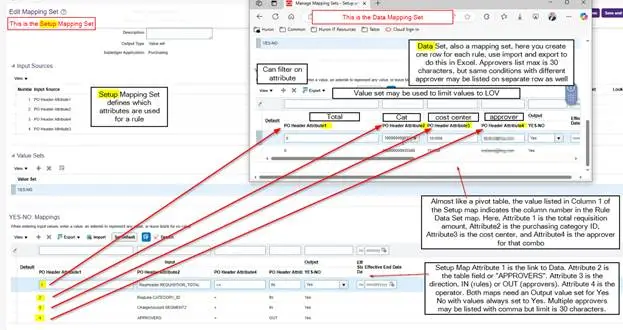
The Setup Mapping Set tells Oracle how to interpret each column in the Data Set mapping set. Without it, Oracle wouldn’t know what each column represents or how to apply it during approval evaluation.
Purpose of the Setup Mapping Set
- Define which attributes are evaluated
- Define comparison operators (e.g., <=, =)
- Identify which column is an input (document attribute) vs an output (approver username)
Setup Mapping Set – Key Attributes Explained
Each row in the Setup Mapping Set corresponds to one column in the Data Set Mapping Set.
| Attribute | Meaning |
|---|---|
| Attribute 1 | The column number which will be used in the Data Set mapping set by the Attribute listed in Attribute2, values like “1” and “2” |
| Attribute 2 | The Oracle attribute being evaluated (e.g., Req Total, Category ID, Cost Center segment) |
| Attribute 3 | Direction: IN for rule criteria, OUT for returned approver |
| Attribute 4 | Operator (e.g., <=, =, etc.) |
Note: Even though these attributes are listed as PO Header Attributes, they do apply to requisitions as well. This is a very common confusion point.
Example Setup Mapping Set Configuration
| Attribute1 | Attribute 2 (What’s Checked) | Direction | Operator | Summary |
|---|---|---|---|---|
| 1 | Requisition Total Amount | IN | ≤ | Attribute 1 defines a maximum requisition amount. Oracle checks whether the requisition total is less than or equal to the value in this column. |
| 2 | Purchasing Category ID | IN | = | Attribute 2 defines the purchasing category. Oracle checks whether the requisition line’s category matches the value in this column. |
| 3 | Charge Account – Segment 2 (Cost Center) | IN | = | Attribute 3 defines a segment of the charge account. Oracle checks whether the requisition distribution’s segment matches the value in this column. |
| 4 | Approvers | OUT | = | Attribute4 defines the approver(s). If the row conditions match, then this is the approver returned by Oracle |
| 5 | Yes / No | n/a | Set to Yes |
Mandatory Design Rule
You must always include:
- An output column with a Yes/No value set
- All returned values for this column must be Yes
This Yes/No output is what allows the approval rule to evaluate the mapping set result cleanly inside BPM.
Mapping Set #2: The Data Set Mapping Set
(Contains the Actual Approval Logic)
The Data Set Mapping Set is where business users usually spend most of their time. It contains the rows that define when approval is required and who the approvers are.
Each column in the Data Set directly maps back to the Setup Mapping Set definitions.
Structure of the Data Set Mapping Set
Each row represents one approval condition. Conceptually, it behaves like a decision table:
| Req Total | Category ID | Cost Center | Approvers | Yes/No |
|---|---|---|---|---|
| 10,000 | 123456789 | 78810 | Michael.Gibby | Yes |
| 15,000 | 450823098 | 23091 | Christopher.Gibby | Yes |
- Columns 1–3 are evaluated as inputs
- Column 4 returns the approver username(s)
- Column 5 always returns Yes
Approver Column Rules
- The Approvers column contains Oracle usernames
- Multiple approvers may be listed, separated by commas – but this is not a LOV, you must type values carefully
- Maximum of 30 characters per cell
- If you exceed the character limit, add another row with the same criteria
Remember that approval rules do not stop after the first match. It identifies all rows that match and returns all valid approvers. You control deduplication via BPM and determine if this is set to none, by stage, or by task overall.
This behavior is critical and intentional—it allows approval lists to scale beyond the 30‑character limit.
Managing Mapping Sets Efficiently
One of the benefits of this approach is to quickly add and edit complex rules in a simple framework. This can be done directly in the UI or via file import.
Filtering in the UI
- You can filter by attribute values directly in the Mapping Set UI
- This is helpful for quick edits or investigations
Import / Export
- Mapping sets can be exported to Excel
- Bulk updates can be made offline
- Changes can then be imported back into Oracle
This is the preferred approach when:
- Managing large approval matrices
- Coordinating updates with Finance or Compliance teams
- Promoting changes across environments
Mapping sets complement—rather than replace—traditional approval rules. They can be combined with standard BPM conditions, hierarchies, and approval stages as needed.
Design Tips & Leading Practices
Keep logic in the Data Set, not BPM.
Mapping sets are easier to maintain and audit than hard‑coded BPM rules.
Document ownership clearly.
Approval mapping sets often become mission‑critical and should have a defined business owner.
Putting it into Practice
Mapping sets are evaluated only when referenced by a BPM approval rule using the corresponding Mapped Approval Attribute. If the BPM rule does not invoke the attribute, the mapping set will not execute.
Set up a rule like
- Requisitioning BU = X
- Functional Currency = USD
- Mapped Approval Attribute 1 is not blank
That last condition is critical — it prevents approval errors when no rows match in the data set.
Then for the action, set up
- Action Type: Approval Required
- Route Using: Single Approver
- User Type: Mapped Approval Attribute 1
In simple terms:
“Route the approval to whoever the mapping set returned.”
This is where your Data Set mapping set output column is consumed.
Final Takeaway
The two‑mapping‑set approach—using a Setup Mapping Set to define logic and a Data Set Mapping Set to hold approval conditions—provides a flexible, scalable, and maintainable way to drive requisition approvals in Oracle Fusion. When implemented thoughtfully, it keeps BPM rules simple, approval logic transparent, and future change fast and low‑risk without workflow rework.
TL;DR
This screenshot with instructions shows both mapping sets in one view, and how the rows in the Setup Mapping Set map to columns in the Data Set Mapping Set.
Finally I’d like to give special thanks to my colleague Logan Stokes. When this feature was first announced, we identified that it may help resolve a critical client need, and Logan volunteered to become our internal expert. He has taught many of our team how to implement this feature and my article builds on his insightful knowledge. We all need coworkers like Logan!